Comic Project: A Bold and Playful Font for Creative Designs
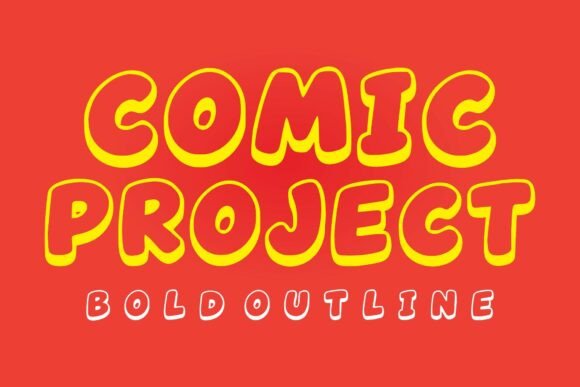
Comic Project Bold Outline is a font that brings a vibrant, cheerful, and energetic vibe to any design. Inspired by the dynamic world of comic books and cartoon lettering, this font features thick, rounded letters with a strong outline effect. Its chunky bubble shapes and smooth curves make it an ideal choice for a wide range of creative projects, from kids' designs to professional branding.
Why Choose Comic Project?
Comic Project stands out with its bold and playful appearance, making it perfect for adding a touch of fun and energy to your designs. Whether you're working on a children's book, a poster, or a social media graphic, this font can help you achieve a visually appealing and engaging look. Its versatility and eye-catching style make it a favorite among designers, marketers, and creators.
Avoid Common Mistakes When Using Comic Project
While Comic Project is a fantastic font, there are some common mistakes that can affect the overall quality and impact of your designs. Here’s how to avoid them:
Mistake 1: Overusing the Font
One of the most frequent errors is overusing Comic Project in a design. While it’s a fun and bold font, using it too much can make your design look cluttered and overwhelming. Tip: Use Comic Project sparingly for headings, titles, or key elements, and pair it with a more neutral, readable font for body text.
Mistake 2: Ignoring Context and Audience
Another common mistake is not considering the context and audience of your design. Comic Project has a playful, youthful feel, which may not be suitable for all types of content. For example, using it in a formal business report might not be appropriate. Tip: Always consider the tone and purpose of your project. If you’re unsure, test different fonts and get feedback from your target audience.
Mistake 3: Poor Spacing and Kerning
Proper spacing and kerning are crucial for readability and visual appeal. Comic Project’s thick, rounded letters can sometimes lead to awkward spacing if not adjusted. Tip: Take the time to adjust the spacing between letters and words to ensure they flow smoothly. Most design software allows you to fine-tune these settings easily.
Mistake 4: Not Testing Readability at Different Sizes
Comic Project’s bold and playful style can sometimes make it less readable at smaller sizes. It’s important to test the font at various sizes to ensure it remains legible. Tip: Start with a larger size for headings and gradually reduce the size for subheadings and other elements. Always check the readability at each size to ensure clarity.
Practical Advice for Using Comic Project Effectively
- Pair with Complementary Fonts: Combine Comic Project with clean, simple fonts like Arial, Helvetica, or Sans Serif to create a balanced and harmonious design.
- Use for Key Elements: Reserve Comic Project for titles, headings, and other prominent elements where its bold and playful style can shine.
- Test and Adjust: Experiment with different sizes and spacing to find the best fit for your design. Don’t hesitate to make adjustments to enhance readability and visual appeal.
- Consider the Brand Tone: Ensure that the playful and energetic style of Comic Project aligns with the brand’s image and message. If it doesn’t, consider a more fitting font.
What to Check Before Making a Decision
Before incorporating Comic Project into your design, here are a few things to check:
- Font Compatibility: Make sure the font is compatible with the design software and platforms you are using.
- Licensing: Verify the licensing terms to ensure you have the right to use the font for your intended purpose, whether it’s personal, commercial, or both.
- Readability and Legibility: Test the font at different sizes and in various contexts to ensure it remains readable and clear.
- Design Consistency: Consider how Comic Project fits with your overall design and brand identity. It should complement, not clash with, other design elements.
By avoiding these common mistakes and following the practical advice, you can effectively use Comic Project to add a vibrant and playful touch to your designs. Remember, the key is to use it thoughtfully and in moderation to achieve the best results.